One shortcode
[instant_quote] puts your widget in any page, post or block that runs shortcodes.
The Measured Bid plugin adds your instant quote widget to any WordPress page with one shortcode. It passes UTM tags and Google Ads click IDs into the widget, so each lead shows where it came from.
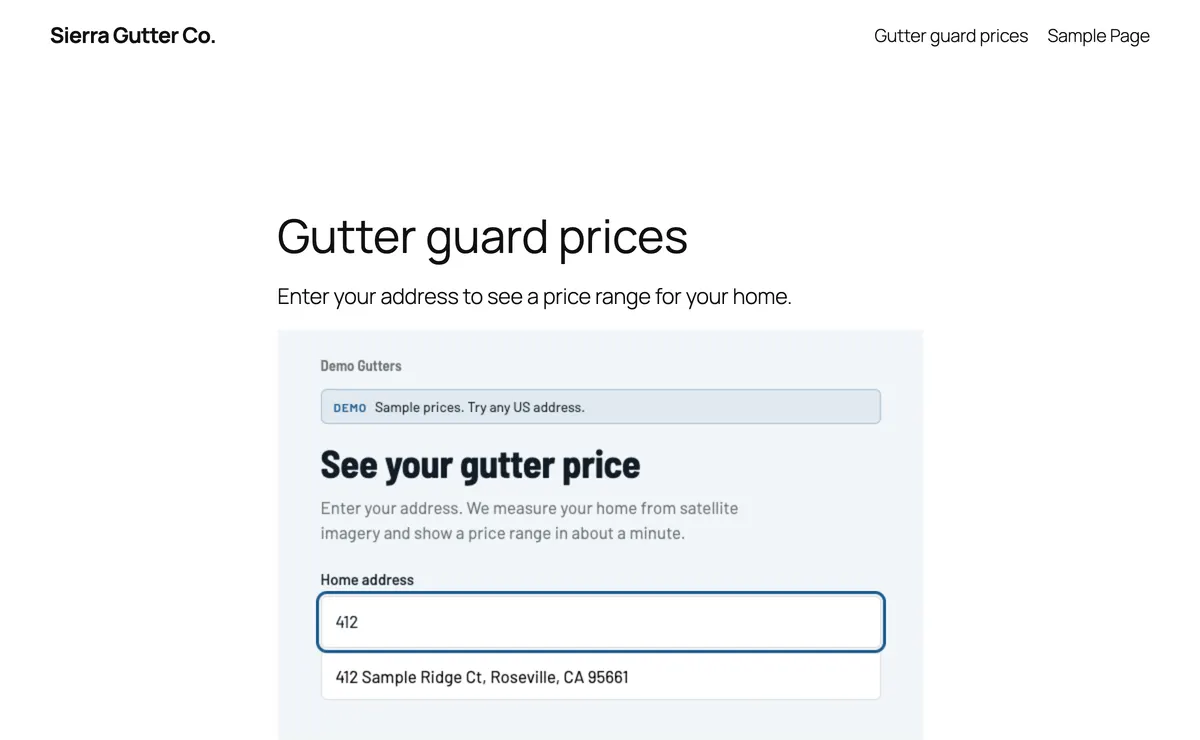
It is a small plugin. The widget itself runs on Measured Bid, so your pricing and leads stay in one place.
[instant_quote] puts your widget in any page, post or block that runs shortcodes.
The frame grows and shrinks with each step, so there is no scroll box inside the page.
UTM tags, click IDs and the page address go into the widget and stay on every lead.
Each step is pushed to the dataLayer as iq_step, ready for Google Tag Manager and GA4.
You need a Measured Bid account with a widget, and a WordPress user who can install plugins.
Download the zip. In WordPress, go to Plugins → Add Plugin (Add New on older versions), click Upload Plugin, choose the file, then install and activate it.
Open Settings → Measured Bid. Set the App URL to https://measuredbid.com. The default brand is optional: it's used when a shortcode has no brand.
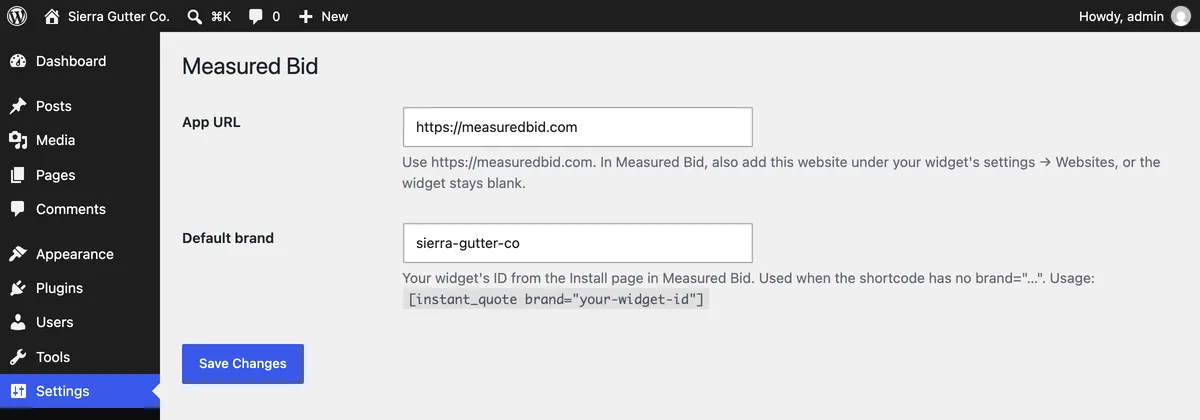
In Measured Bid, open the widget's settings and list your site under Websites, with both the www and non-www addresses if you use both. Skip this and the widget shows a blank box.
Copy the shortcode from the widget's Install page in Measured Bid and paste it into a Shortcode block on any page.
[instant_quote brand="your-widget-id" title="Instant gutter price"]| Option | Default | What it does |
|---|---|---|
| brand | Your default brand | Your widget's ID from the Install page. Optional when you set a default under Settings → Measured Bid. |
| title | Instant price | The iframe title screen readers announce. |
| min_height | 640 | Starting height in pixels before the widget reports its size. The smallest allowed is 320. |
When a visitor lands on the page from an ad or a tagged link, the plugin copies these values from the page address into the widget, along with the page address itself.
| Parameter | What it is |
|---|---|
| utm_source | Campaign source, such as google |
| utm_medium | Channel, such as cpc |
| utm_campaign | Campaign name |
| utm_term | Keyword |
| utm_content | Ad or link variant |
| gclid | Google Ads click ID |
| gbraid | Google Ads click ID used on iOS traffic |
| wbraid | Google Ads click ID used on iOS traffic |
| fbclid | Facebook and Instagram click ID |
| msclkid | Microsoft Ads click ID |
window.dataLayer.push({
  event: "iq_step",
  step: "result",
  brand: "your-widget-id"
});| step | When it fires |
|---|---|
| address | The address form is showing |
| confirm | They picked an address and see their house |
| result | They see their price range |
| no_data | No roof data, so they see the visit form |
| booked | They sent their details |
Use the website code from the widget's Install page. It does the same work in the visitor's browser.
See all the install options on the instant quote widget page.
Add your website under Websites in the widget's settings in Measured Bid, with both the www and non-www addresses if your site uses both. The widget only loads on sites listed there. Then check that the App URL under Settings → Measured Bid is https://measuredbid.com.
Yes. The plugin shows your widget, and the widget runs on your Measured Bid account and pricing. New accounts get 14 days or 25 estimates free, with no card.
It works anywhere WordPress runs shortcodes, such as the Shortcode block in the block editor. Most page builders have a shortcode element too.
It can. The plugin copies UTM tags and click IDs into the widget when WordPress builds the page. If a caching plugin serves one saved copy of the page to every visitor, those tags may not reach the widget. Leave the widget page out of the cache, or use the website code instead, which reads the tags in the visitor's browser.
Yes. Each shortcode gets its own frame, and one script on the page sizes each of them. Pass a different brand to each shortcode.
The plugin is free and licensed GPLv2 or later. The widget it shows needs a Measured Bid plan.
Start a trial, set your rates, then install the plugin. 14 days or 25 estimates free, no card.